ChromaVerb in Logic Pro X: An overview

In this entry, one of the four stock reverb plug-ins of the DAW Logic Pro X called ChromaVerb, will be presented. Reverb itself is one of the most commonly used spatial effects in the world, as it can simulate a particular space or environment and change the context of a sound in many different ways. ChromaVerb was chosen as according to the manufacturer, it differs from other digital reverbs. Therefore, how does it operate and what is its overall effect towards the sound?
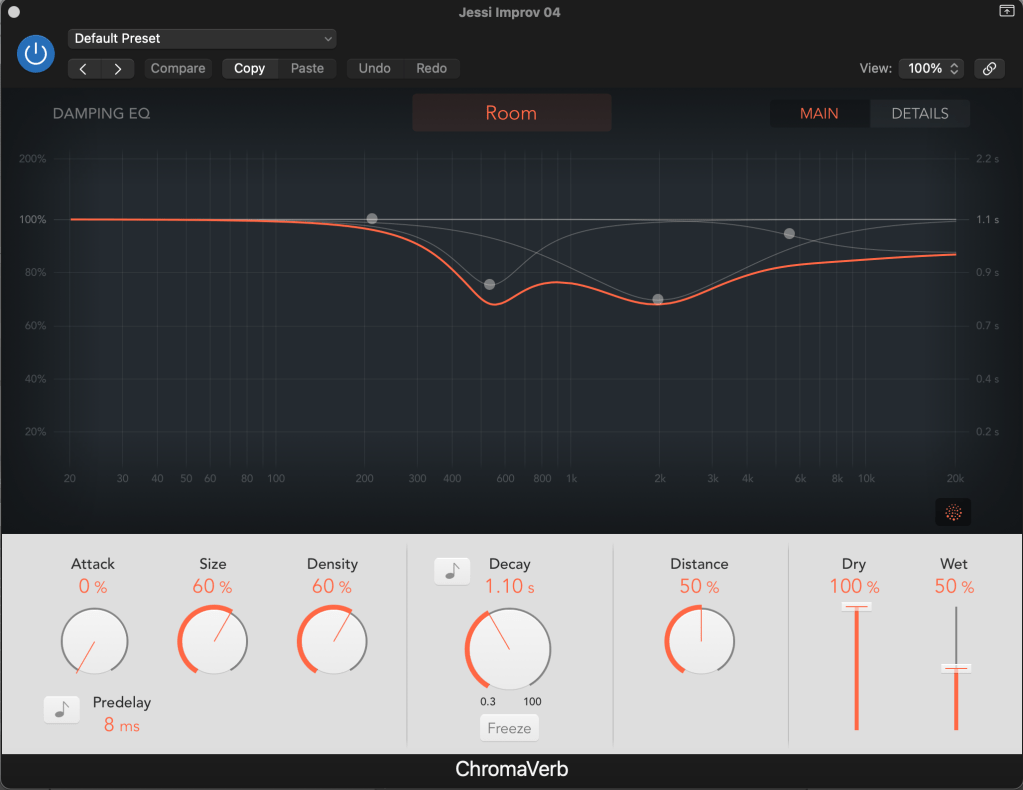
Figure 01: The Main Window

To begin with, it must be mentioned that this reverb is based around a circular structure, in which sound is moderately absorbed, and it contains 14 different room-type algorithms. If the user is not familiar with its interface, it still contains various presets, which can be used to demonstrate a different spatial effect for a particular sound (ie. simulate the way in which a space reflects sound). For example, it contains a selection of:

  • Ambiences
  • Chambers
  • FX
  • Halls
  • Rooms
  • Spaces
  • Synth Reverbs

ChromaVerb’s interface contains many common controls which can be found in many other reverb plug-ins, like the attack, size, density, and decay. These parameters determine the way that the sound responds inside space, and most of them are affected by the room type selection (Figure 02).
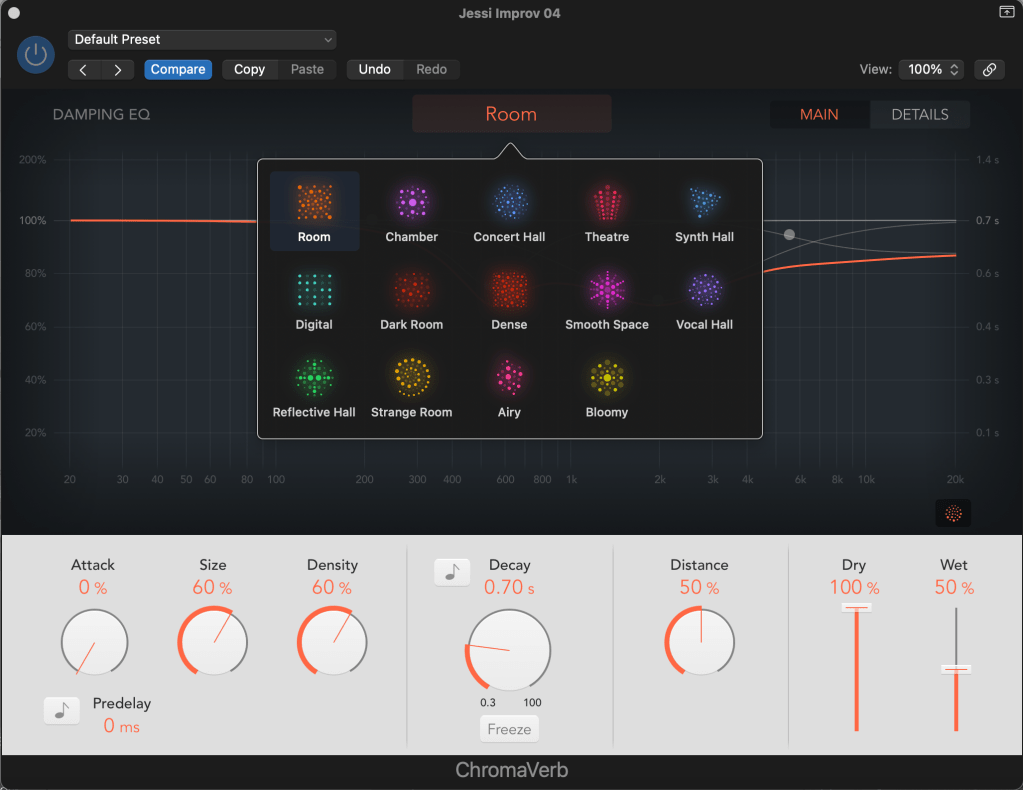
Figure 02: 14 Different Room Types

Attack: Determines how fast the overall effect kicks in, and affects either the volume over time, or the density build-up time (depends on the type of room).

Size: Controls the dimensions of a room, with bigger ones having a higher percentage of it.

Density: Refers to the adjustment of early and late reflections at the same time.

Decay: Affects the length of the decay and it is measured in seconds or time signature. The signal can also be recirculated infinitely by using the Freeze button next to the decay knob.

Distance: Used to portray the distance of the source.

Pre-delay: Adds early reflections to the signal.

Dry & Wet Faders: Adjust the output levels of the original and processed signal.

In simpler terms, the bottom end of the interface is utilized to “shape” the sound and structure its response inside a specific environment.

Furthermore, the user can also alter the decay’s frequency response by using the Damping EQ section. According to the manufacturer, it contains “four bands, with independent high and low shelving EQ bands, and two parametric EQ bands.” This tool is highly significant, as it enables for more precise and accurate adjustments of the decay, and provides a visual graphic representation in real time.
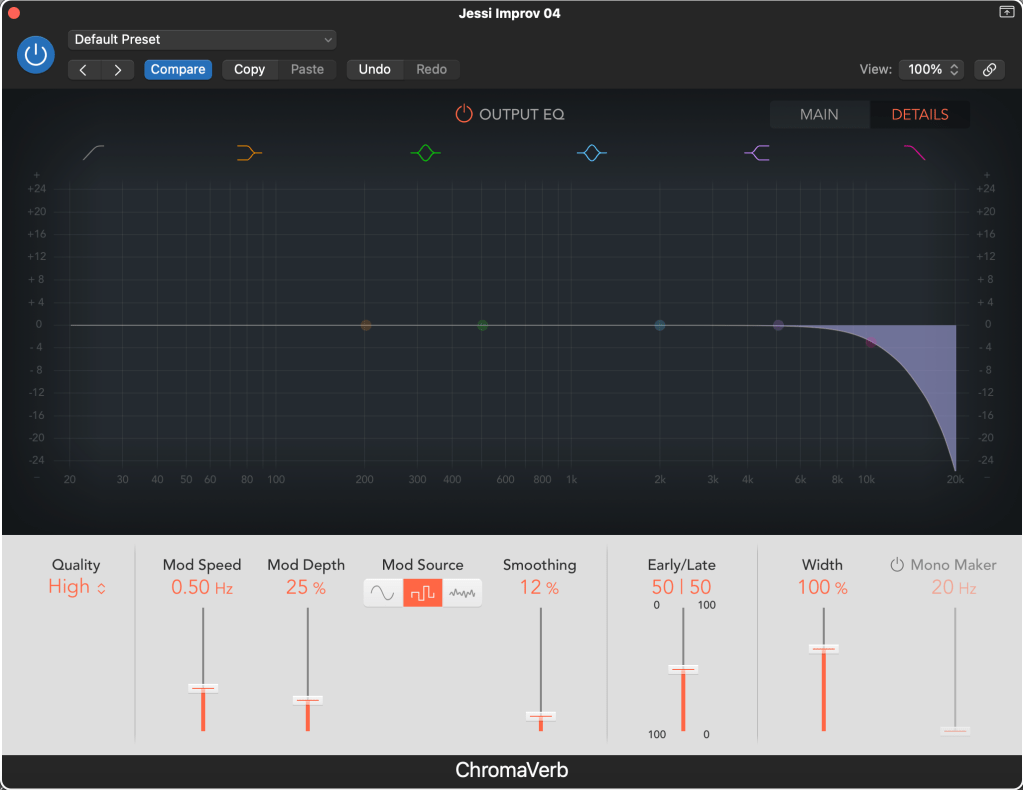
Figure 03: Details Section

By clicking on the Details section at the top-right corner the Output EQ will appear, which moderates the combined signal with the use of a six-band equalizer (Figure 03). It is further accompanied by a new selection of controls, which can be used to change the reverb’s quality, stereo width, the speed/modulation/waveform/shape of the LFO, and remove a specific range of stereo frequencies (Mono Maker).

Tip: As previously mentioned, reverb can be used to affect the spatial image of a sound. Therefore, it is most commonly used with dry sources like vocals or snares. ChromaVerb contains a particular room type which adds great depth to the overall sound, called “Vocal Hall“. Insert ChromaVerb in a bus, and try this room type with a vocal!

Overall, ChromaVerb is a very useful spatial effect which can be used in any possible way to portray or enhance a sound’s characteristics inside different spaces. It is significant that the interface involves many different controls, as it enables the user to be more creative and consider different parameters, depending on the desired outcome. Additionally, people who don’t have access to appropriate designed spatial environments can utilize this particular audio effect and achieve high quality results.

Total words: 631

Name: Konstantinos Papanestoros

Date of Publication: 21 February 2024

Blog entry No. 03, as part of the Blog assessment of the Module “Spatial Audio Production” (MATT3017) of De Montfort University, Leicester.

Images: Konstantinos Papanestoros

Bibliography:

(No date) Logic pro effects. Available at: https://help.apple.com/pdf/logicpromac-effects/en_US/logic-pro-mac-effects-user-guide.pdf (Accessed: 20 February 2024). 
3D Audio Technology of Sony’s Playstation 5

In 2020, Sony released Playstation 5, which is the fifth model of the well known Playstation series, mainly oriented for gaming purposes. In this particular model, Sony developed an engine which supports 3D Audio technology known as “Tempest 3D AudioTech”, which is something that many gaming enthusiasts around the world desired. So why is this technology important and how does it enhance the gaming experience?

First, what is 3D Audio? According to Davies (2022), 3D Audio is “..an umbrella term for a number of immersive audio technologies that aim to surround the listener with sound. The goal is to reproduce audio in a way that replicates the way we hear sound in the real world, especially when compared to the mono and stereo experiences most have become accustomed to. The result goes beyond what a ‘physical’ 5.1 or 7.1 surround sound setup can achieve, as 3D Audio can make sounds come through virtually every direction, including above.”

Therefore, this technology is highly important for a gaming console like PS5, as the directionality of different sounds becomes more precise and realistic, assisting the gamer to locate on or offscreen enemy’s footsteps or movements of military trucks inside a virtual battlefield, for example.

Sony’s 3D Audio Technology was developed to work with different output systems, including TV Speakers, headphones, stereo, 5.1, and 7.1. The whole 3D Audio system is based around HTRF (Head-Related Transfer Functions), which “describes an acoustic transfer function between a point sound source in the free-field and a defined position in the listener’s ear canal, and plays an essential role in creating immersive virtual acoustic environments (VAEs) reproduced over headphones or loudspeakers.” (Li et al. 2020). Since each individual person has a unique HRTF as we anatomically differ from one another, Sony conducted an immerse study to measure individual people’s HRFT and created five individual options from which the user can select when setting up 3D Audio on a PS5 console.

To be specific, the user can accurately measure the acoustics of their room by following the instructions in the PS5 console. “This is a process where the console sends out a string of sounds at different volumes to gauge how big a room is for the simulated surround sound.” (McLoughlin, 2023). This process can be also undertaken with headphones, in which the user can test different sounds by moving them from left to right, and then compare the standard stereo output with the 3D Audio output.

Overall, Sony’s 3D Audio Technology is a very significant development in the world of Spatial Audio, as through its implementation the gaming experience is highly improved. Sound localization plays a crucial role in the overall quality of a modern game, as it makes a game more realistic and portrays the visual aspects more accurately (which have rapidly improved in the last decades too). Many companies like Sony continue to develop and improve similar systems through the study of more HRTF. In the future, the settings can become even more accurate as more people will be investigated, and as a result the gaming experience will be further improved.

Total words: 513

Name: Konstantinos Papanestoros

Date of Publication: 21 February 2024

Blog entry No. 02, as part of the Blog assessment of the Module “Spatial Audio Production” (MATT3017) of De Montfort University, Leicester.

Bibliography:

Davies, H. (2022) What is 3D audio? the immersive audio feature explainedTrusted Reviews. Available at: https://www.trustedreviews.com/explainer/what-is-3d-audio-4220209 (Accessed: 19 February 2024). 

How to set up 3D audio on PS5 consoles (no date) How to set up 3D audio on PS5 consoles (UK). Available at: https://www.playstation.com/en-gb/support/hardware/3d-audio-ps5/ (Accessed: 19 February 2024). 

Li, S. and Peissig, J. (2020) Measurement of head-related transfer functions: A ReviewMDPI. Available at: https://www.mdpi.com/2076-3417/10/14/5014#:~:text=A%20head%2Drelated%20transfer%20function,reproduced%20over%20headphones%20or%20loudspeakers. (Accessed: 19 February 2024). 

McLoughlin, A. (2023) PS5 3D audio explained: How this technology brings games to lifeTechRadar. Available at: https://www.techradar.com/features/ps5-3d-audio-explained-how-this-technology-brings-games-to-life (Accessed: 19 February 2024). 

Wykes, A.J. (2021) Sony PlayStation 5: What is 3D audio?SoundGuys. Available at: https://www.soundguys.com/sony-playstation-5-3d-audio-49201/# (Accessed: 19 February 2024). 

Investigating The Mac Surround Panner Of Logic Pro X

Inside the DAW Logic Pro X, there is a very important tool for any sound designer, engineer, or editor who works with multichannel formats, which is the Surround Panner. So why is this particular tool important and how does it work?

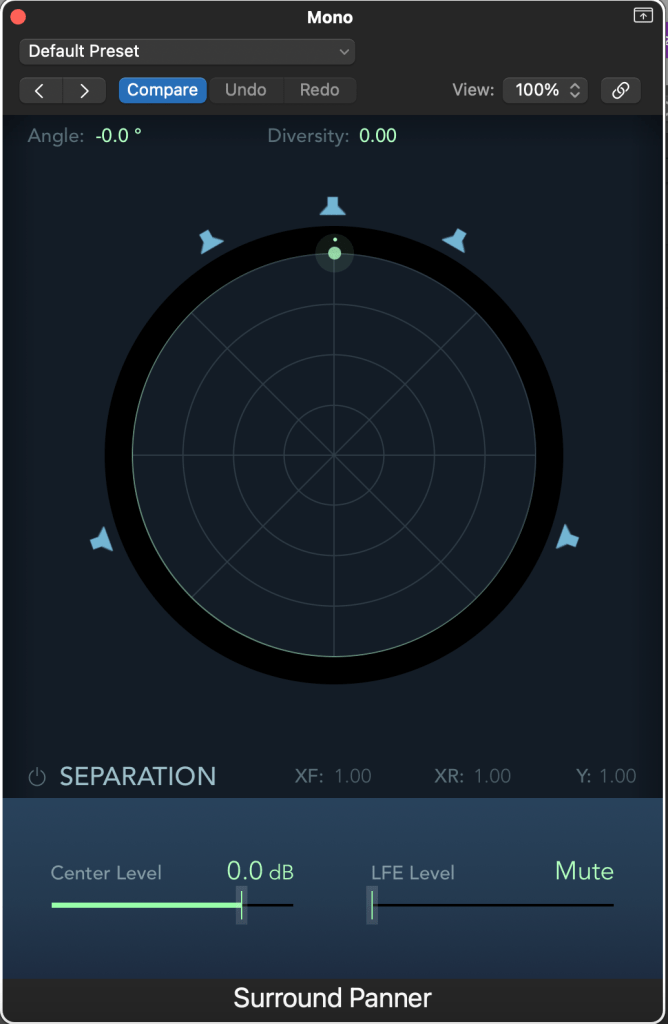
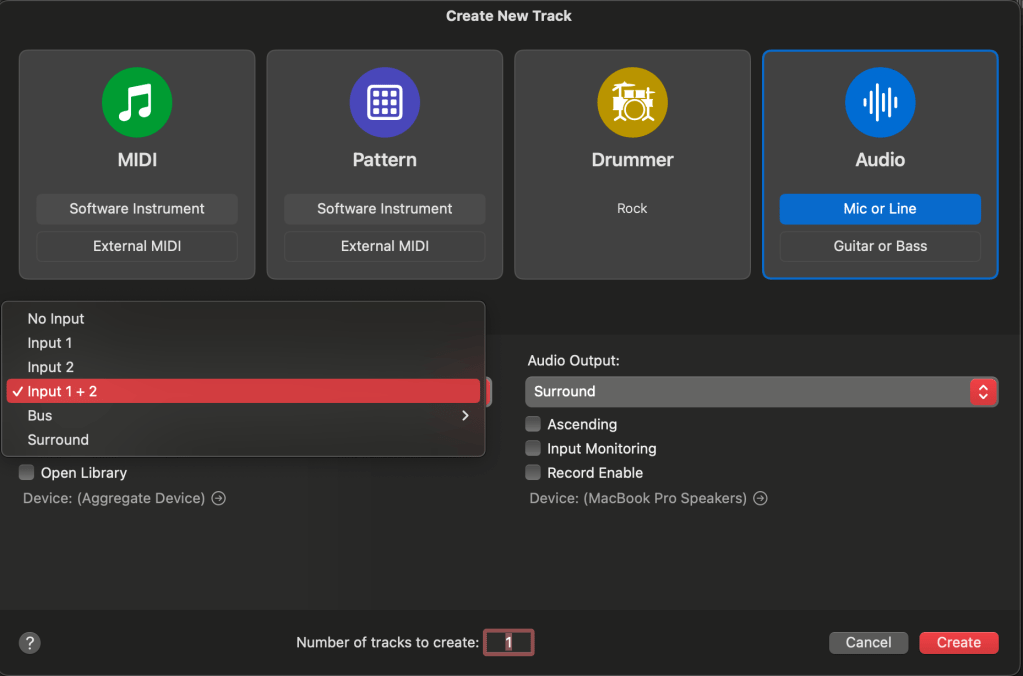
At the beginning, the user must decide what the input format of the channel will be, and there are three choices. Mono, stereo, or surround. As the investigation focuses on the Surround Panner, the output of all channels will be Surround. In addition, a surround bus can be also utilized, if needed by the user. It must be noted that the output can be altered by the output of the last inserted plug-in, when in mono or stereo formats. In Figure 1, the input and output formats can be observed. Input 1 and Input 2 (separately) stand for mono, Input 1 + 2 stand for stereo, and Surround stands for a Surround channel.

Figure 01: The creation of a track inside Logic Pro X and the available formats.

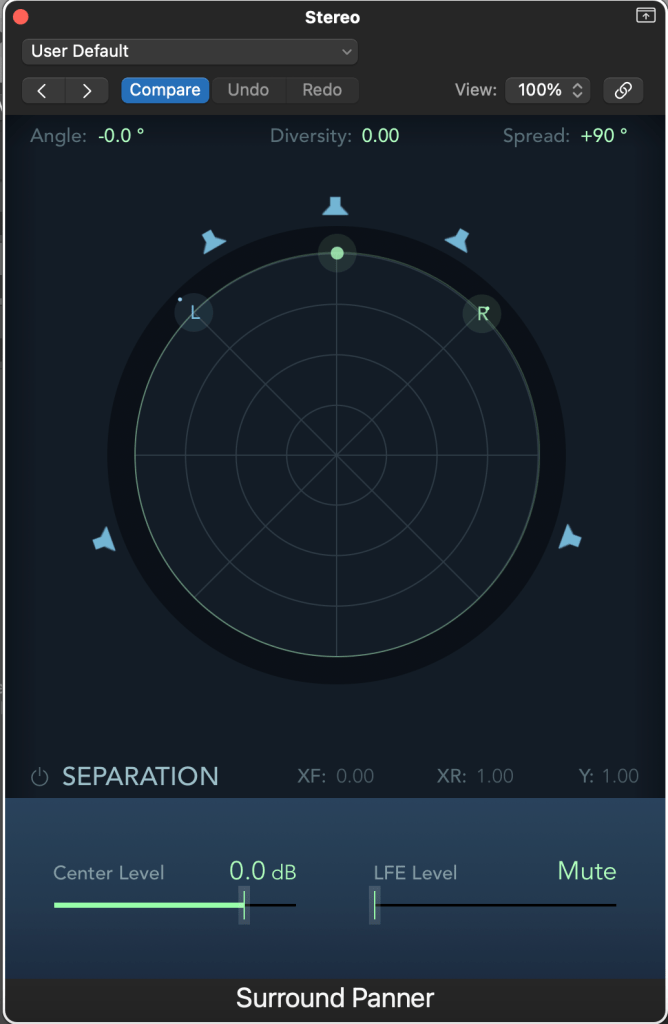
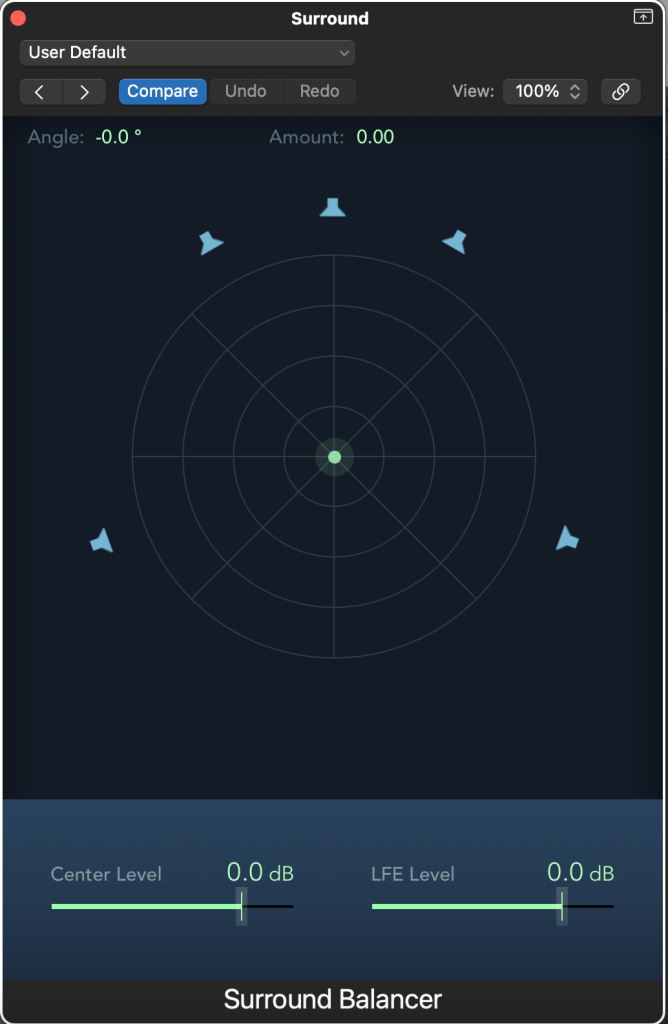
After creating the track(s), the user can access their windows individually and proceed to further adjustments. Mono and stereo formats use the Surround Panner, while the Surround format uses the Surround Balancer.

Mono

The mono format contains two main parameters, which are Angle and Diversity. Angle determines the surround output of the track, and diversity can make the sound wider (playback from more sources). The closer the pan puck (green dot) is to a speaker icon, the stronger the signal is. By clicking on a speaker icon, it basically mutes or unmutes a particular sound source. For example, if the diversity parameter is set to 1, then the sound will be played back from all sources (fully mono).

Furthermore, the bottom part of the panner includes more parameters which can assist the user to be able to better control and affect the overall sound (Separation: XF, XY, Y). These controls are not available for the surround channel. Basically, the signal gets mixed between the left and right channels located at the front (XF) and side (XY). The Y separation parameter mixes all signals together. The signal routed in the centre can be also be increased or reduced (in dB) with the Centre Level fader, and the LFE can boost the low frequencies of the signal (usually used with a subwoofer).

Stereo

In a stereo – surround format, most of the parameters remain the same. But as now the user is working with two inputs (left and right), there is also a unique control added to it in order to control those channels. By using the Spread button located at the top – right end of the window, the user can affect the width of the sound. If the value of the Spread becomes negative, then the two channels swap, which can be a brilliant tool to be used with automation, for example (automation can be used both the Surround Panner/Balancer for all parameters).

Surround

As it can be clearly observed in Figure 04, the Surround Balancer, used with the surround input format, differs from the mono and stereo surround panners. The Diversity parameter is replaced by the Amount parameter, which determines the focus of the surround output. Additionally, by moving towards a specific speaker, the output of other channels is decreased. The user can still change the center and LFE levels by using the two faders located at the bottom of the window.

Figure 04: A Surround Balancer window.

Overall, the Surround Panner of Logic Pro X is a brilliant tool which can shape in complex ways the overall spatial image of a sound in a multi channel format, as the user can affect the output in many possible ways. Additionally, by adding different input formats there is a greater flexibility for the user, who can save significant time and work in a more professional manner.

Total words: 627

Name: Konstantinos Papanestoros

Date of Publication: 18 February 2024

Blog entry No. 01, as part of the Blog assessment of the Module “Spatial Audio Production” (MATT3017) of De Montfort University, Leicester.

Images: Konstantinos Papanestoros

Bibliography:

Surround panner parameters in Logic Pro for Mac (no date) Apple Support. Available at: https://support.apple.com/en-gb/guide/logicpro/lgcp7a500829/10.8/mac/13.5 (Accessed: 19 February 2024). 

Montage Track

For the short Montage track, I recorded four different sounds. These sounds are:

  1. Paper Roll
  2. Keys
  3. Electronic Vape Puff
  4. Cutting Paper

I applied various montage techniques like Reverse and Trim. The end result is not something great, but I enjoyed the process of creating and editing these random sounds.

Alice in Wonderland – First Thoughts

My final portfolio work for this academic year will include the creation of a soundtrack, which will be used in two different clips of the film “Alice in Wonderland”. The two extracts will be taken from:

  1. Alice in Wonderland (1903) – Lewis Carroll | BFI National Archive
  2. Alice im Wunderland – Anime 1992 – VHS

My concept will combine two different types of film from two different eras. The first one was published in 1903 and it is a silent film, while the second one is an anime film published in 1992. The technological advancements and the way each film was created will enable me to produce different soundtracks.

My intention is to compose classical music for the 1903 film, since I believe this type of music matches with the 1900s era. For the anime, I want to compose a modernised piece, with some characteristics emerging from the 1990s decade.

The combination of the two might have a great contrast since the anime was created almost 100 years later, but when modern cultures mix with older ones, great results can be achieved.

Live Sampling

What is sampling?

Sampling is the process that includes the reuse of a sound recording, which include parameters such as rhythm or melody. Samples can be manipulated by adding different sound effects, changing the tempo or by chopping them in different parts, and therefore creating a whole different melody. Today, there are thousands of artists which produce sample packs and sell them online for any genre of music.

When was sampling used for the first time?

The first time that a process similar to sampling was introduced was back in the 1940s, in the musical piece called “Musique Concrete”. In this piece, techniques like splicing and tape looping were used. Today, there are both hardware and digital samplers, found in many DAWs.

Mixers

What is a mixing board and what are its capabilities?

  • Mix multiple signals together
  • Amplifies incoming signals
  • Combines incoming signals into a single
  • EQ/Filtering
  • Sends/receives, for example effects units
  • Monitoring

Sections of a Mixer

  • Organised form left to right, top to bottom
  • Following a Sequence
  • Master faders control the overall output

Points to Check when not receiving any sound 

  • Check the mixer gets power
  • Check that Phantom Power is turned on
  • Phase button

What can you preserve on a mixer?

  • Gain – Preamplifier
  • EQ/Filters
  • Auxiliary Sends (AUX)
  • Panning
  • Mute/Solo
  • Channel Fader
  • Inserts
  • Master Fader

Turning things off – Always normalise the gear

Follow the correct order by following a reverse order. Bring down all faders and turn off the loudspeakers, so the equipment will not get damaged and also avoid any ear-drum injury from exposure to very loud sounds.

Loudspeakers

Loudspeakers are a form of an Audio Transducer by transforming an electric signal to an acoustical signal. There are two types of loudspeakers to consider, and these are :

Passive Loudspeakers

  • Require an amplification stage
  • Do not require power

Active Loudspeakers

  • Carry their own amplifier
  • Require power
  • Do not require an external amplifier

Woofer Vs Tweeter Loudspeakers

Woofer loudspeakers are designed to work better with low frequencies, since they have a larger diaphragm. Tweeter loudspeakers work better with high frequencies, and have a much lower mass than woofer loudspeakers.

Important points to consider when trying to decide what loudspeaker type to use

When for example a great concert or a large party is going to take place and you are in charge for setting up the loudspeakers, you have to take some decisions, according to the certain circumstances.

  • Size
  • Volume/Amplification
  • Imaging & Clarity
  • Location – What / Who is being amplified and where are they?
  • Who is listening and where?

According to many sources, the Loudspeaker Industry is growing and it is expected to expand even more, due to an excessive demand and a variety of technological advancements, which in many cases exceed every limit and expectation.

Microphones

Microphone is a great example of a transducer. But, what is a transducer?

A transducer is basically anything that converts a signal of any kind to a signal of another type, from physical to electrical or the opposite. One great example is a loudspeaker, which exhibits sound waves for us to perceive.

Some other examples include hydrophones and contact mics. Hydrophones can pick up vibrations in water, while contact mics can pick up vibrations through solids. During the session, we had a great opportunity to be given some contact mics, and experiment on different objects. My group managed to get a very unique sound from a skateboard by spinning the wheels and placing the contact mic on the metal barrier between them. The result was getting a sound which otherwise, you would never be able to hear it.

Furthermore, there are some types/categories of microphones which are very important both to know and understand.

Dynamic Microphones

  • Do not require Phantom Power
  • Work better with loud/strong sounds
  • Better for a live setting

Condenser Microphones

  • Require Phantom Power
  • Offer faster and sharper attack
  • Much more responsive and precise
  • Work better with higher frequencies

Polar Patterns

These are patterns which represent the sensitive areas of a microphone, and where it works better in capturing sound.

  1. Omnidirectional : Non-directional, not good for stage use, since there is a great risk of feedback and present of other sound sources. No proxy – effect ( bass boost due to close distance ).
  2. Cardioid : Cover front/sides, not covering the back side of the microphone. May exhibit proximity effect.

Session 03: Editing

Editing is the process of selecting and preparing writtenphotographicvisualaudible, or cinematic material used by a person or an entity to convey a message or information. ”

— > Source : https://en.wikipedia.org/wiki/Editing

Have you ever thought, that you use editing almost every day of your life? From preparing an assignment in your laptop, all over from taking a photo and changing the colour or adding text to it. This is the beauty of technological advancement, since now, not only rich people and specialised companies have editing devices, but you can edit your photograph or a video freely and without any delays, or costs.

3 basic fundamentals of Editing

  1. Concept : When you are editing, there is a number of aspects that you need to consider before you start. You have to organise, check the flow of your work, so the reader/listener/viewer will be directed where you want him to, but also the most important aspect is how you will present it. From a movie scene, all over to a simple 10 second advertisement.
  2. Techniques : There are 5 basic tools in editing. Cut / Splice / Fade / Reverse / Slow Down – Speed up .
  3. Language : In editing we have certain words that are used to describe an action that we may want to do. Copy and paste, are one of the best examples given.